在Go开发中,通常会使用类似 var _ core.TweetSearchService = (*bridgeTweetSearchServant)(nil) 的语句借助Go编译器在 编译期 检测某个类型是否完全实现了某个接口的所有方法,比如此例, 如果 *bridgeTweetSearchServant 缺失 接口 core.TweetSearchService 的某些方法实现,Go将会在编译期报错,不能成功编译App.
在工程实践中,可以在 包内 将这类 接口实现约束(Constraint) 语句 统一放在 constraint.go 中,并添加 build tag //go:build constraint 使用tag条件编译机制,只有在使用 go build -tags constraint 时才会进行接口实现约束的检测,在编译产品App时就不带 constraint tag,也就不会把这些 只应在开发期有效的语句 编译到最终的App中。
以下是 『paopao-ce』 的一个使用实例:
// file: https://github.com/rocboss/paopao-ce/blob/dev/internal/dao/search/constraint.go

//go:build constraint

package search

import "github.com/rocboss/paopao-ce/internal/core"

var (
	_ core.TweetSearchService = (*bridgeTweetSearchServant)(nil)

	_ core.TweetSearchService = (*meiliTweetSearchServant)(nil)
	_ core.VersionInfo        = (*meiliTweetSearchServant)(nil)

	_ core.TweetSearchService = (*zincTweetSearchServant)(nil)
	_ core.VersionInfo        = (*zincTweetSearchServant)(nil)
)
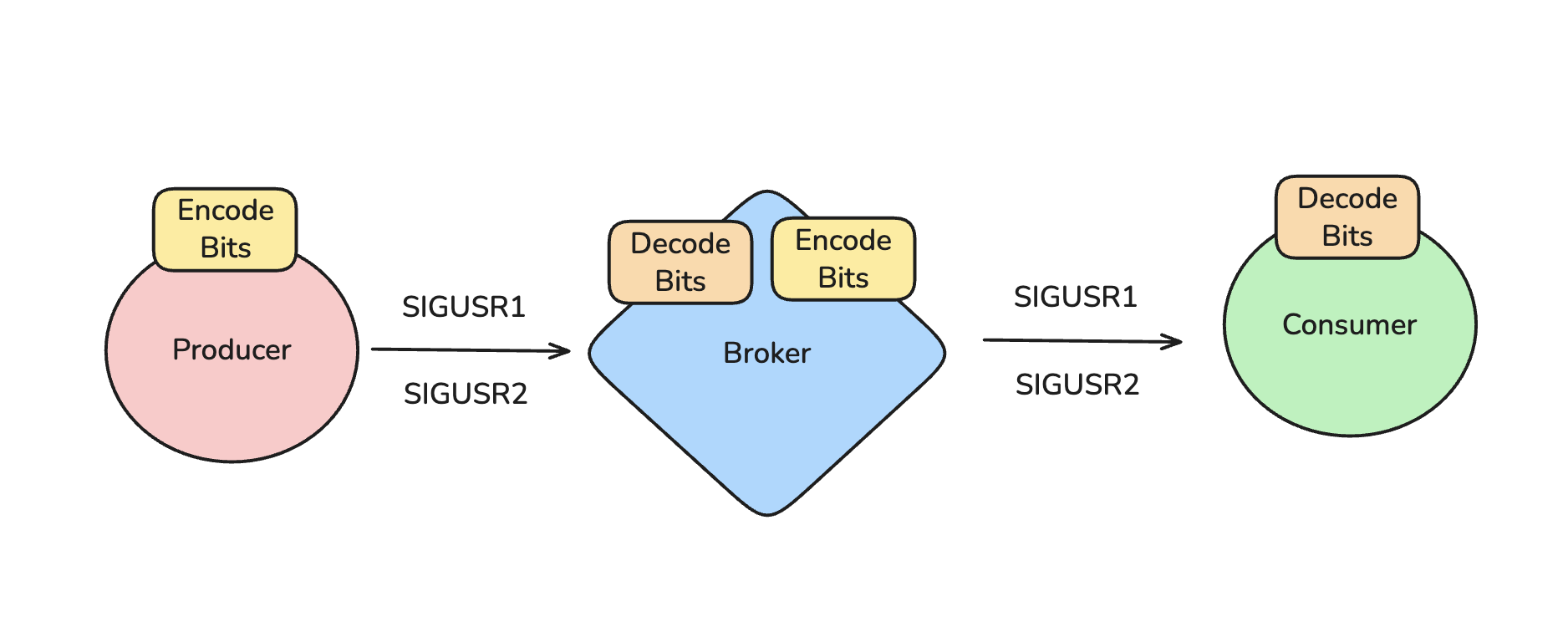
Have you ever asked yourself what if we could replace any message broker with a very simple one using only two UNIX signals? Well, I’m not surprised if you didn’t. But I did. And I want to share my journey of how I achieved it.
If you want to learn about UNIX signals, binary operations the easy way, how a message broker works under the hood, and a bit of Ruby, this post is for you.
And if you came here just because of the clickbait title, I apologize and invite you to keep reading. It’ll be fun, I promise.
It’s all about UNIX
A few days ago, I saw some discussion on the internet about how we could send messages between processes. Many people think of sockets, which are the most common way to send messages, even allowing communication across different machines and networks. Some don’t even realize that pipes are another way to send messages between processes:
$ echo 'hello' | base64
aGVsbG8K
rpcx 的 请求(request)和响应(response)使用相同的数据结构。
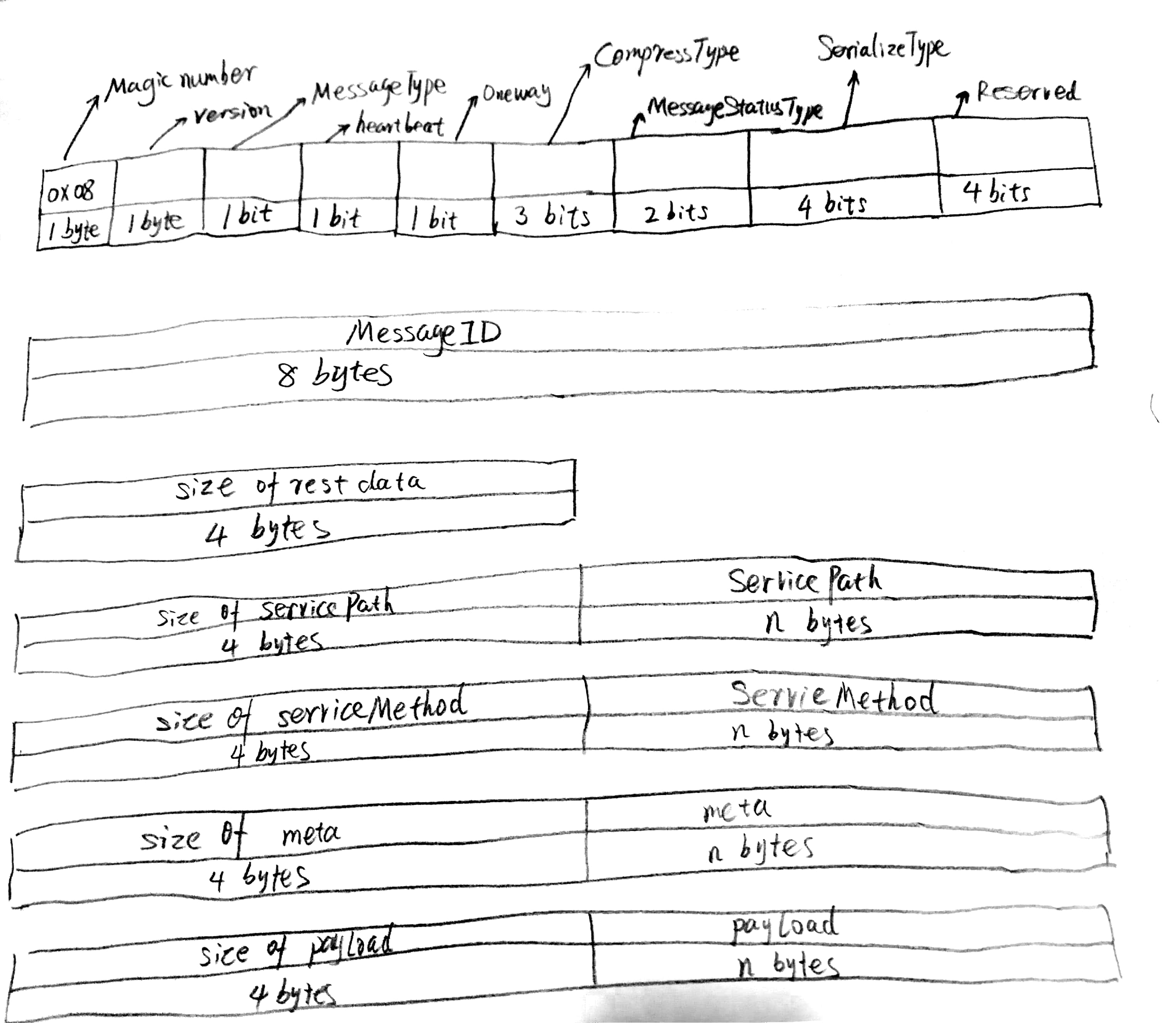
一个消息由下面的项组成:
参考 Thrift THeader 协议 ,Kitex设计了 TTheader 协议。
协议编码
 0 1 2 3 4 5 6 7 8 9 a b c d e f 0 1 2 3 4 5 6 7 8 9 a b c d e f
+----------------------------------------------------------------+
| 0|                          LENGTH                             |
+----------------------------------------------------------------+
| 0|       HEADER MAGIC          |            FLAGS              |
+----------------------------------------------------------------+
|                         SEQUENCE NUMBER                        |
+----------------------------------------------------------------+
| 0|     HEADER SIZE             | ...
+---------------------------------

                  Header is of variable size:
                   (and starts at offset 14)

+----------------------------------------------------------------+
| PROTOCOL ID  |NUM TRANSFORMS . |TRANSFORM 0 ID (uint8)|
+----------------------------------------------------------------+
|  TRANSFORM 0 DATA ...
+----------------------------------------------------------------+
|         ...                              ...                   |
+----------------------------------------------------------------+
| INFO 0 ID (uint8)|       INFO 0  DATA ...
+----------------------------------------------------------------+
|         ...                              ...                   |
+----------------------------------------------------------------+
|                                                                |
|                              PAYLOAD                           |
|                                                                |
+----------------------------------------------------------------+
Header format for the THeader.h
      0 1 2 3 4 5 6 7 8 9 a b c d e f 0 1 2 3 4 5 6 7 8 9 a b c d e f
    +----------------------------------------------------------------+
    | 0|                          LENGTH                             |
    +----------------------------------------------------------------+
    | 0|       HEADER MAGIC          |            FLAGS              |
    +----------------------------------------------------------------+
    |                         SEQUENCE NUMBER                        |
    +----------------------------------------------------------------+
    | 0|     Header Size(/32)        | ...
    +---------------------------------

                      Header is of variable size:
                       (and starts at offset 14)

    +----------------------------------------------------------------+
    |         PROTOCOL ID  (varint)  |   NUM TRANSFORMS (varint)     |
    +----------------------------------------------------------------+
    |      TRANSFORM 0 ID (varint)   |        TRANSFORM 0 DATA ...
    +----------------------------------------------------------------+
    |         ...                              ...                   |
    +----------------------------------------------------------------+
    |        INFO 0 ID (varint)      |       INFO 0  DATA ...
    +----------------------------------------------------------------+
    |         ...                              ...                   |
    +----------------------------------------------------------------+
    |                                                                |
    |                              PAYLOAD                           |
    |                                                                |
    +----------------------------------------------------------------+
The LENGTH field is 32 bits, and counts the remaining bytes in the
packet, NOT including the length field. The header size field is 16
bits, and defines the size of the header remaining NOT including the
HEADER MAGIC, FLAGS, SEQUENCE NUMBER and header size fields. The
Header size field is in bytes/4.

李奔腾: “我现在…自身难保”
李奔腾: “跟我一起创业的老兄弟不会放过我的”
李奔腾: “我有可能…”
李奔腾: “要被迫放弃麒麟”
李奔腾: “不过也挺好的,一无所有也是一个新的开始 ”
罗 维: “所以…对于你来说,到底是生意更重要,还是兄弟更重要?”
李奔腾: “ 不做一个梦,就不算兄弟 ”
李奔腾: “生意,一点都不重要”
……
同步指定目录中所有git库的一个简单shell脚本。
$ git sync -maxdepth 3
> Found 89 repositories.

> Synching gin 1% (1/89)
Already up to date.
> Synching gin finish.

> Synching yj 2% (2/89)
Already up to date.
> Synching yj finish.

> Synching go-cmp 3% (3/89)
Already up to date.
> Synching go-cmp finish.

> Synching opentelemetry-go-contrib 4% (4/89)
remote: Enumerating objects: 775, done.
remote: Counting objects: 100% (363/363), done.
remote: Compressing objects: 100% (117/117), done.
remote: Total 775 (delta 264), reused 307 (delta 240), pack-reused 412 (from 3)
Receiving objects: 100% (775/775), 351.23 KiB | 636.00 KiB/s, done.
Resolving deltas: 100% (448/448), completed with 79 local objects.
TL的Type是一个总类型Class包含不同的结构子类型实例Object,类似于Protubuf中Message与Oneof的关系。
Telegram的RPC TL片段1:
peerUser#9db1bc6d user_id:int = Peer;
peerChat#bad0e5bb chat_id:int = Peer;
peerChannel#bddde532 channel_id:int = Peer;

folderPeer#e9baa668 peer:Peer folder_id:int = FolderPeer;